


Shielded cables are essential in various industries, providing protection against electromagnetic interference (EMI) and ensuring reliable signal transmission. As a shielded cable supplier, I've seen my fair share of cable issues and have learned a thing or two about how to fix them. In this blog, I'll share some common repair methods for shielded cables that you can use to keep your systems running smoothly.
Identifying the Problem
Before you can start repairing a shielded cable, you need to figure out what's wrong with it. Here are some common issues you might encounter:
- Physical Damage: This can include cuts, abrasions, or breaks in the cable's outer jacket or inner conductors. Physical damage can expose the shielding and conductors, leading to EMI and signal loss.
- Shielding Failure: The shielding in a shielded cable is designed to protect the conductors from EMI. If the shielding is damaged or not properly grounded, it can't do its job effectively.
- Connector Issues: Loose, damaged, or corroded connectors can cause signal loss or intermittent connections. Connectors are often the weakest point in a cable assembly, so it's important to check them regularly.
Repairing Physical Damage
If you notice physical damage to a shielded cable, the first step is to assess the extent of the damage. Minor cuts or abrasions to the outer jacket can usually be repaired with electrical tape or heat shrink tubing. Here's how:
- Clean the Area: Use a clean, dry cloth to remove any dirt or debris from the damaged area.
- Apply Electrical Tape or Heat Shrink Tubing: For minor cuts, you can wrap electrical tape around the damaged area to provide a temporary repair. Make sure to overlap the tape slightly to ensure a secure seal. If you have heat shrink tubing, you can slide it over the damaged area and use a heat gun to shrink it in place. This provides a more permanent and professional-looking repair.
For more severe damage, such as a break in the conductors, you'll need to splice the cable. Here's a step-by-step guide on how to splice a shielded cable:
- Prepare the Cable: Cut the damaged section of the cable off, leaving enough length to make a proper splice. Strip the outer jacket and shielding back about 2 inches to expose the conductors.
- Strip the Conductors: Use a wire stripper to strip about 1/2 inch of insulation from the ends of the conductors.
- Twist the Conductors Together: Match the corresponding conductors from each end of the cable and twist them together tightly.
- Solder the Connections: Apply a small amount of solder to each connection to secure the conductors and improve conductivity.
- Reapply the Shielding: Once the connections are soldered, you'll need to reapply the shielding. You can use a conductive tape or a new piece of shielding material to cover the spliced area. Make sure to ground the shielding properly to ensure effective EMI protection.
- Insulate the Splice: Finally, use electrical tape or heat shrink tubing to insulate the spliced area and protect it from further damage.
Fixing Shielding Failure
If you suspect that the shielding in a shielded cable is damaged or not properly grounded, you'll need to check the shielding and the grounding connections. Here's how:
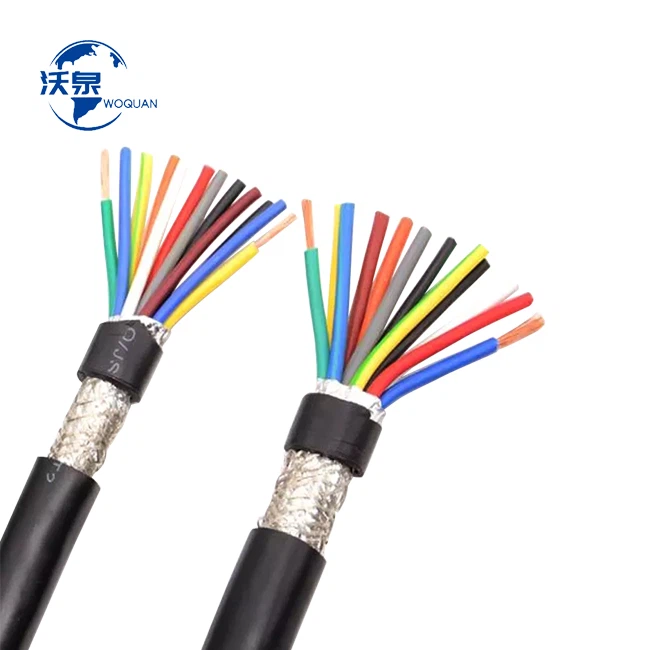

- Inspect the Shielding: Look for any visible damage to the shielding, such as cuts, tears, or holes. If you find any damage, you'll need to repair or replace the shielding.
- Check the Grounding Connections: Make sure that the shielding is properly grounded at both ends of the cable. A loose or corroded grounding connection can prevent the shielding from working effectively. You can use a multimeter to check the continuity of the grounding connection.
- Repair or Replace the Shielding: If the shielding is damaged, you can try to repair it using conductive tape or a new piece of shielding material. If the damage is too severe, you'll need to replace the cable.
Addressing Connector Issues
Connector issues are a common problem with shielded cables. Here are some tips on how to fix them:
- Check the Connectors: Inspect the connectors for any signs of damage, such as loose pins, bent pins, or corrosion. If you find any damage, you'll need to replace the connector.
- Clean the Connectors: If the connectors are dirty or corroded, you can clean them using a contact cleaner and a soft brush. Make sure to dry the connectors thoroughly before reconnecting them.
- Tighten the Connectors: Loose connectors can cause signal loss or intermittent connections. Make sure that the connectors are tightened securely to the cable and the equipment.
Preventive Maintenance
Preventive maintenance is key to keeping your shielded cables in good working condition. Here are some tips to help you prevent cable problems:
- Inspect Cables Regularly: Check your shielded cables regularly for signs of wear and tear, such as physical damage, connector issues, or shielding problems.
- Use Proper Installation Techniques: Make sure that your shielded cables are installed correctly, with proper grounding and strain relief. Improper installation can cause premature cable failure.
- Protect Cables from Physical Damage: Avoid bending, pulling, or pinching shielded cables, as this can damage the conductors or the shielding. Use cable management systems to keep cables organized and protected.
Conclusion
As a shielded cable supplier, I know how important it is to keep your cables in good working condition. By following the repair methods and preventive maintenance tips outlined in this blog, you can extend the life of your shielded cables and ensure reliable signal transmission.
If you're in the market for high-quality shielded cables, we've got you covered. Check out our Multi Cores Copper Wire High Flexible PVC Insulation Shield Control Cable, 450V 750V 4 Core Shielded Electrical Flexible Cable Wires, and Flexible Copper Conductor Shielded Control Cable. We offer a wide range of shielded cables to meet your specific needs.
If you have any questions or need help with cable selection or repair, don't hesitate to reach out. We're here to assist you with all your shielded cable needs. Let's start a conversation and see how we can work together to keep your systems running smoothly.
References
- "Electrical Wiring Installation Work" by John Towler
- "Cabling: The Complete Guide to Network Wiring" by Andrew S. Tanenbaum


